Free tool · no account

Free online STL viewer for dental scans.

Open STL, PLY and OBJ files right in your browser, with nothing to install. Rotate, measure distances and angles, cut sections and see the contacts between the arches.

Works on a computer, a tablet or a phone.

Open your scan files

Drop them here or choose them: STL, PLY, OBJ, and the ZIP and 3OXZ archives a scanner exports

Your files stay on your device. They are not uploaded anywhere.

What you can do

More than turning a model around.

It is the same viewer dental labs use in Neocliniq, on their own cases.

Contacts

See the contacts between the arches.

Open both arches of one export and the contact map colours each arch by its distance to the opposite one.

  • Overlap, contact and bands up to 2 mm, with a legend.
  • An undercut map along a path of insertion you choose.
  • A thickness map for crowns and other closed parts.
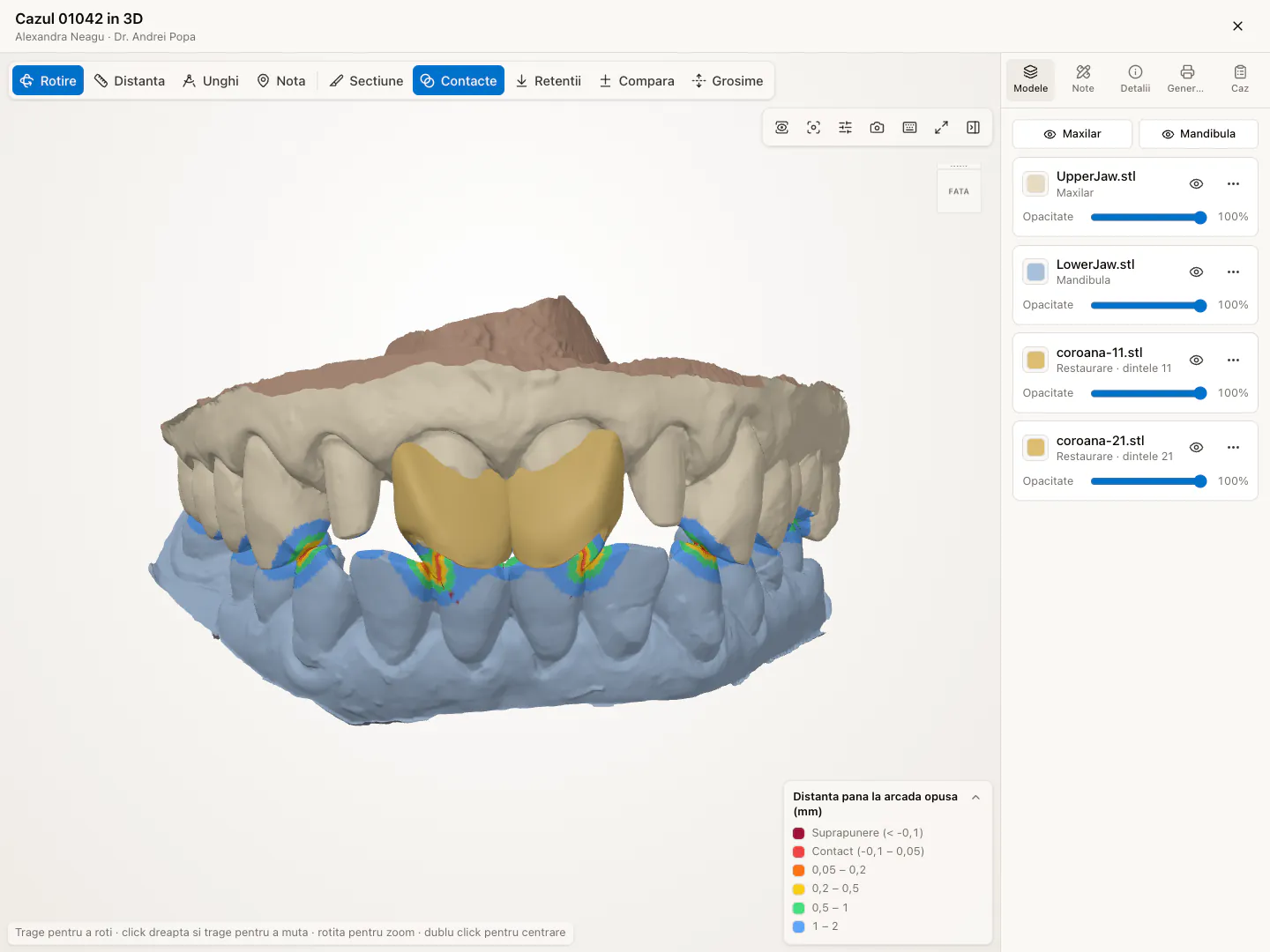
The Neocliniq 3D viewer with the contact map on: the lower arch coloured by its distance to the upper one, with the legend in millimetres and the list of the case’s files.View full-size screenshot ↗
Actual Neocliniq screens in Romanian, with demo data. Names, cases and amounts are fictional.

Measurements

Measure right on the surface.

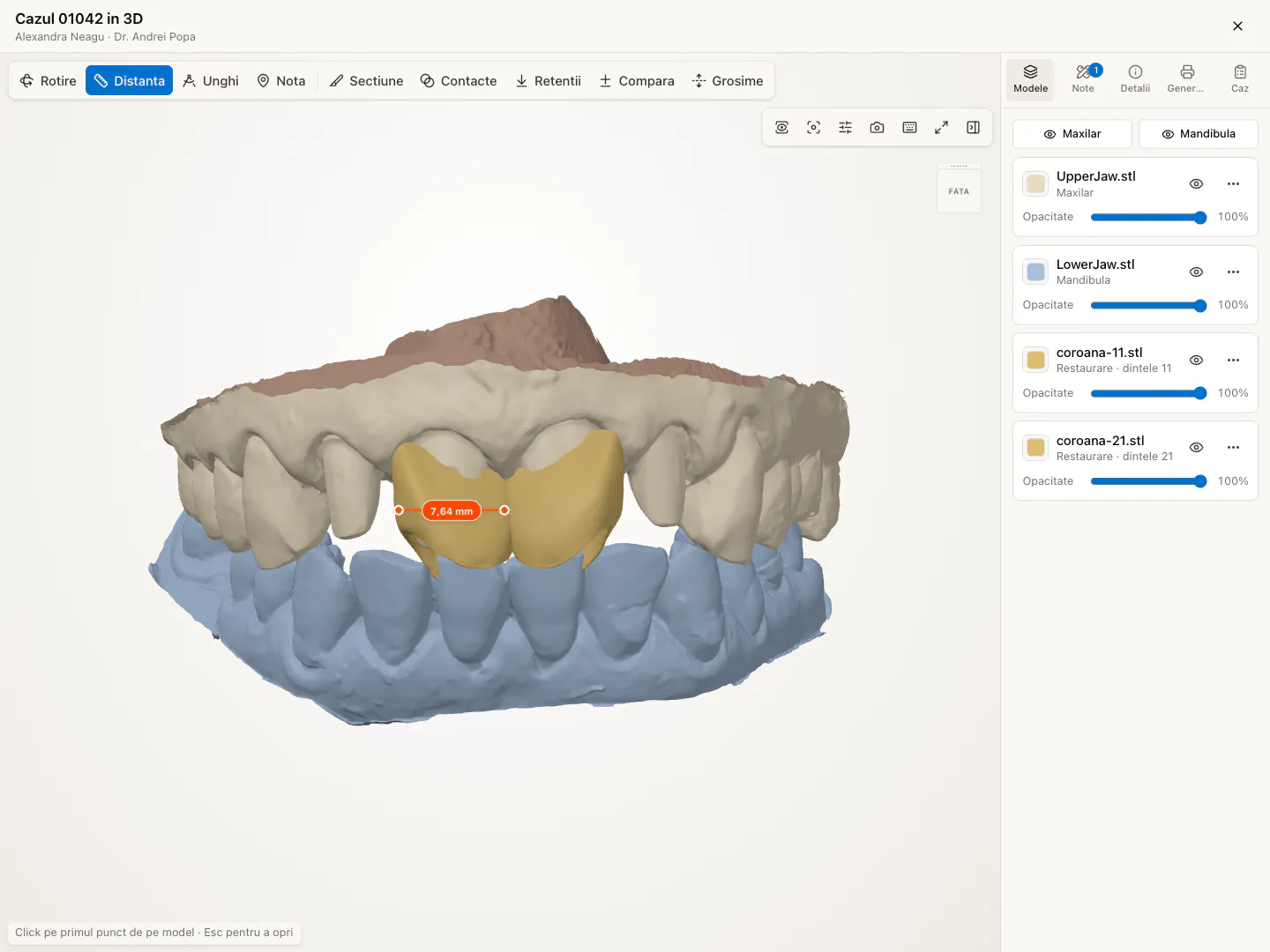
Click two points and read the distance in millimetres. Angles are just as quick.

  • Distances and angles on the surface of the scan.
  • A section through the model, seen in profile, with measurements on its outline.
  • Notes pinned to the surface, which also appear in the picture you save.
The Neocliniq 3D viewer on a case: both arches in occlusion with two crown designs in place, and a 7.64 mm distance measured across a crown.View full-size screenshot ↗
Actual Neocliniq screens in Romanian, with demo data. Names, cases and amounts are fictional.

In short

What the viewer can do.

  • STL, PLY, OBJ, ZIP and 3OXZ

    Open separate files or the archive a scanner exports, with every model inside it. DCM files are not opened.

  • The scanner’s colours

    PLY scans show in their own colours. The others get colours you can change, with adjustable opacity.

  • Sections

    Cut the model with a plane and look at the cut in profile.

  • Compare two scans

    The same arch before and after preparation: see in colour how much was taken away, up to 3 mm.

  • Pictures and view sheets

    Download a picture of the current view, or one sheet with six standard views.

  • Nothing uploaded

    Your browser reads the files on your own device. They never reach our servers and we do not keep them.

In Neocliniq

The same viewer, on every case of the lab.

In Neocliniq you attach the scan to the case and open it in one click, with the patient, the teeth and the due date beside it. Pictures you save stay with the case, and the whole team sees the same files.

FAQ

Questions about the viewer

Is it free?

Yes. You need no account, and there is no limit on files or on time. The viewer is made by Neocliniq, software for dental labs, where the same viewer opens scans straight from the case.

Are my files uploaded to the internet?

No. Your browser reads the files on your own device, and they are not sent to our servers. When you close the page, nothing is left with us.

Which files can I open?

STL (binary and text), PLY (in the scanner’s colours) and OBJ, plus ZIP archives and 3Shape 3OXZ exports, from which every model is opened. DCM files are not opened: export the scan as STL or PLY.

Does it work on a phone?

Yes. On a phone you turn the model with one finger and zoom with two. Very large scans need a lot of memory, so for longer work a computer or a tablet is more comfortable.

Can I measure on the scan?

Yes. Measure distances and angles on the surface, cut sections, and see colour maps for contacts, undercuts, thickness and the difference between two scans of the same arch.

Can I keep what I measured?

Measurements and notes are not saved on the page, but you can download them in a picture or in a sheet of six views. In Neocliniq, pictures are saved straight into the case’s documents.

Open a scan now.

Free, with no account. Your files stay with you.