Dental clinic software, from the appointment to the invoice.
Appointments by dentist, patient records with medical history and tooth chart, treatment plans with your clinic's own prices, invoices and dentist pay. All in one app, in the browser.
30 days to try the full product. Cancel anytime in the app.
View full-size screenshot ↗Actual Neocliniq screens in Romanian, with demo data. Names, cases and amounts are fictional.
Built for dentistry. FDI tooth chart, periodontal chart and phased plans, not a generic calendar.
Nothing to install. Runs in the browser, on a computer, tablet or phone.
Reception does not see the clinical record. Each role reaches only what it needs.
Data hosted in the European Union. Microsoft Azure infrastructure.
Features
Four screens you open every day.
The calendar for reception, the record for the dentist, the plan for the patient and the invoice at the end. They are linked, so nothing is written twice.
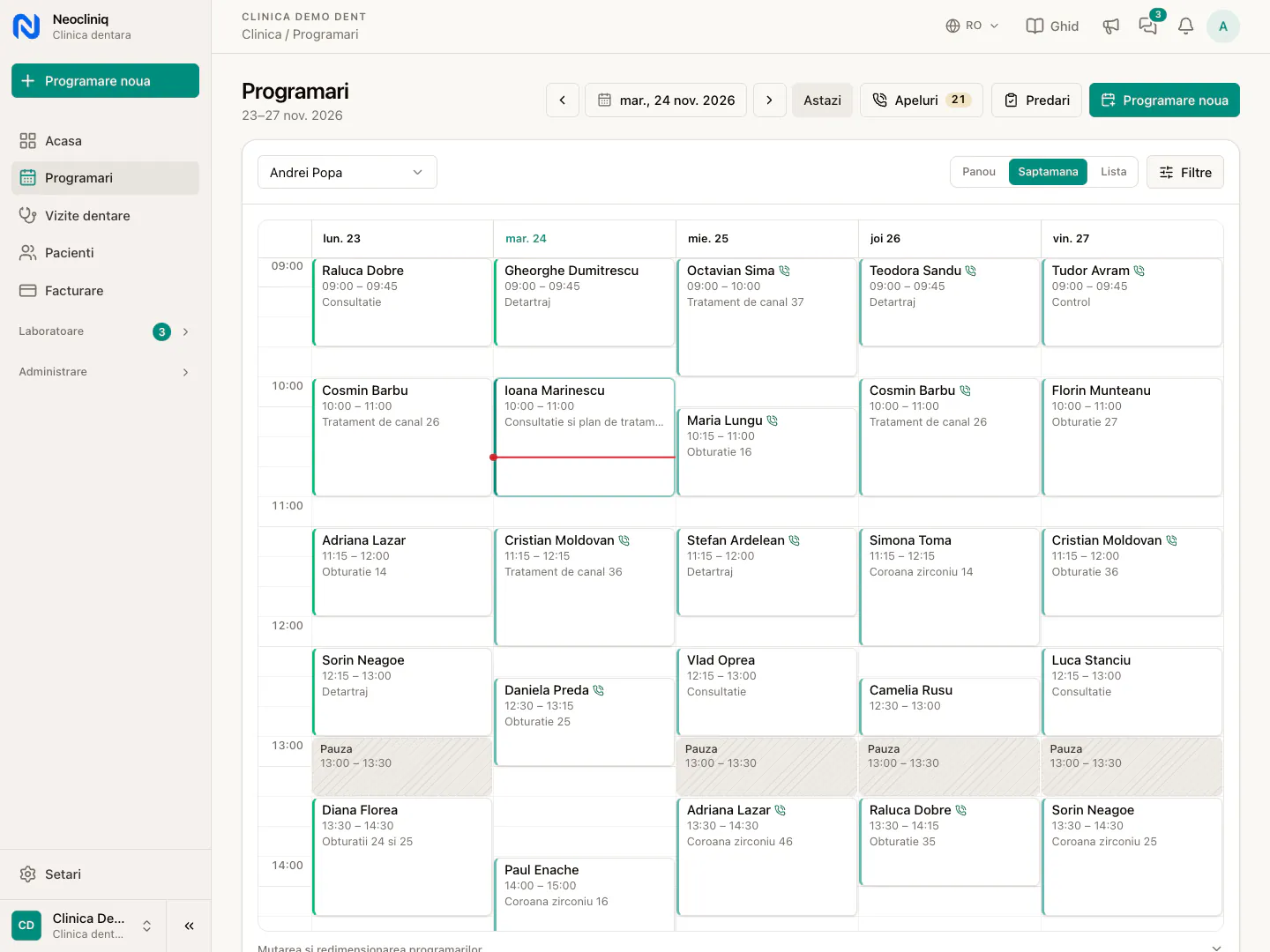
Appointments
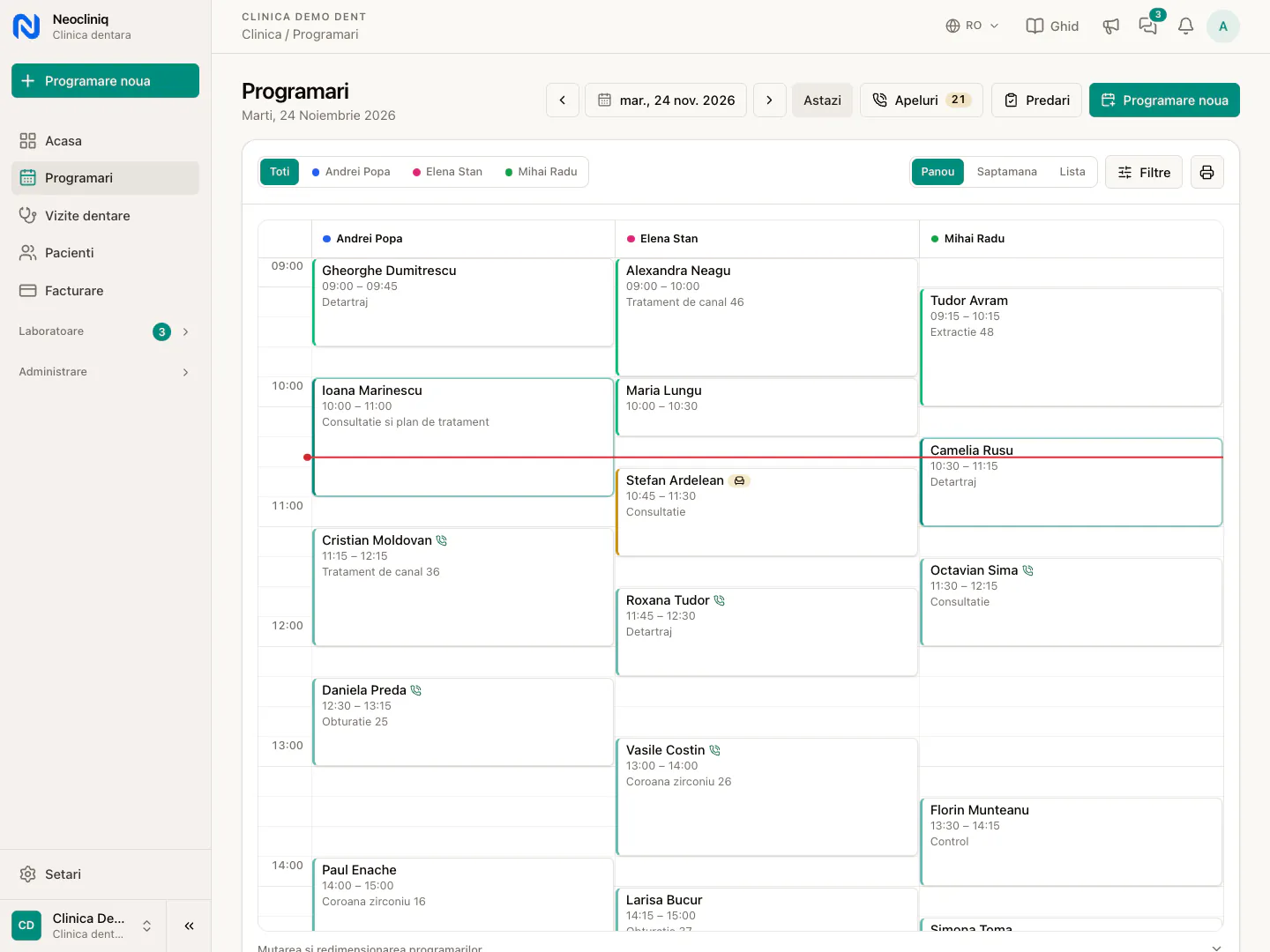
The clinic's day, with every dentist in their own column.
See the day by dentist, one dentist's week, or the list of appointments. Move an appointment by dragging it, and the app warns you when it overlaps another.
Marks for “confirmed by phone” and “arrived”
Breaks, leave, closed days and public holidays
The next appointment, booked from inside the visit
The day's schedule, printed as a PDF
View full-size screenshot ↗Actual Neocliniq screens in Romanian, with demo data. Names, cases and amounts are fictional.
Patient record
The patient's history, tooth by tooth.
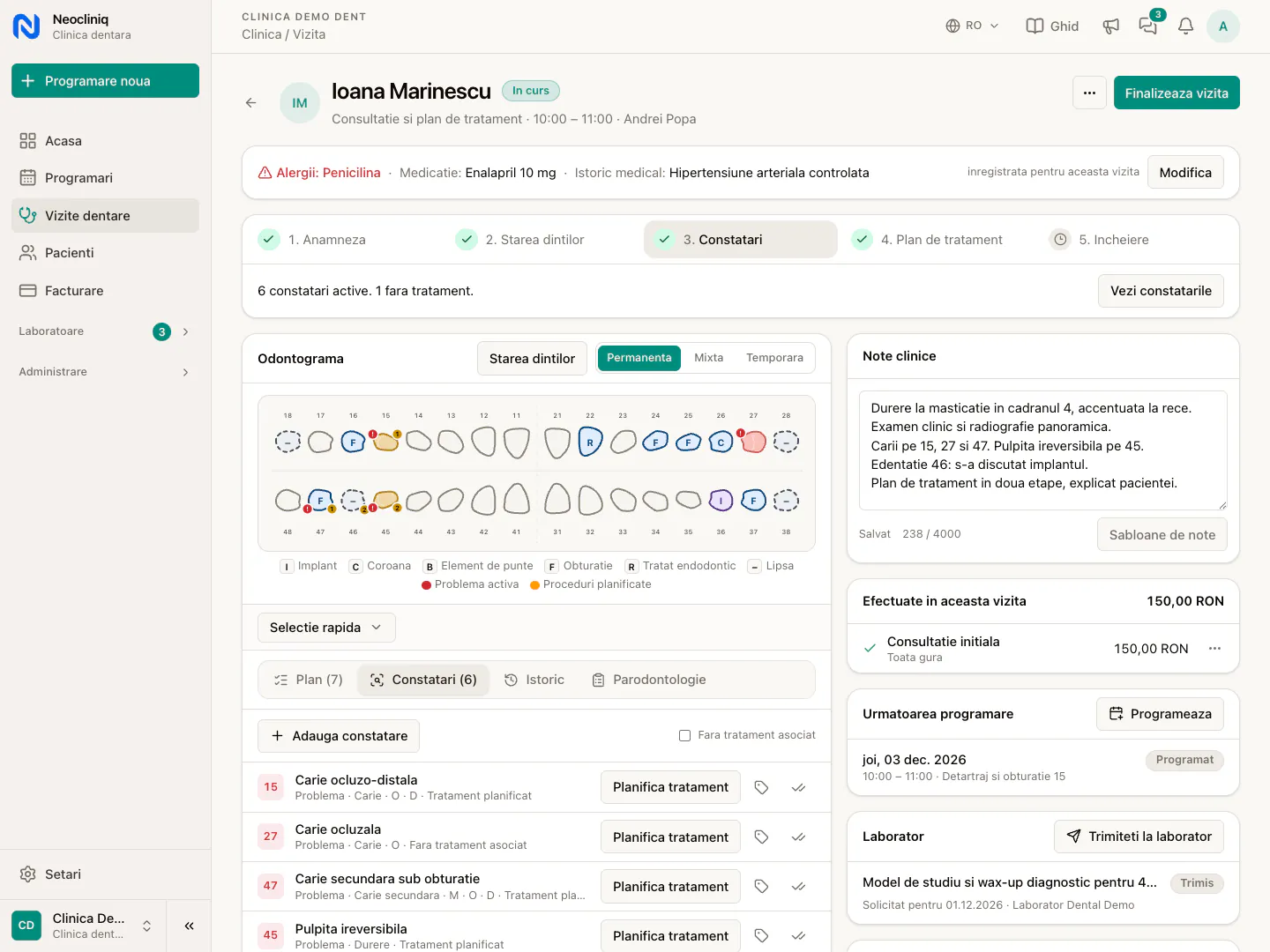
The medical history with allergies, the tooth chart in FDI notation and the findings stay on the record, with the history of every change. At the next visit you see exactly what you found and what you did.
Permanent, primary and mixed dentition
Fillings, crowns, bridges, implants and missing teeth
History filtered by tooth
Periodontal chart, comparing two examinations
View full-size screenshot ↗Actual Neocliniq screens in Romanian, with demo data. Names, cases and amounts are fictional.
Treatment plan
A clear plan and a clear price, before you start.
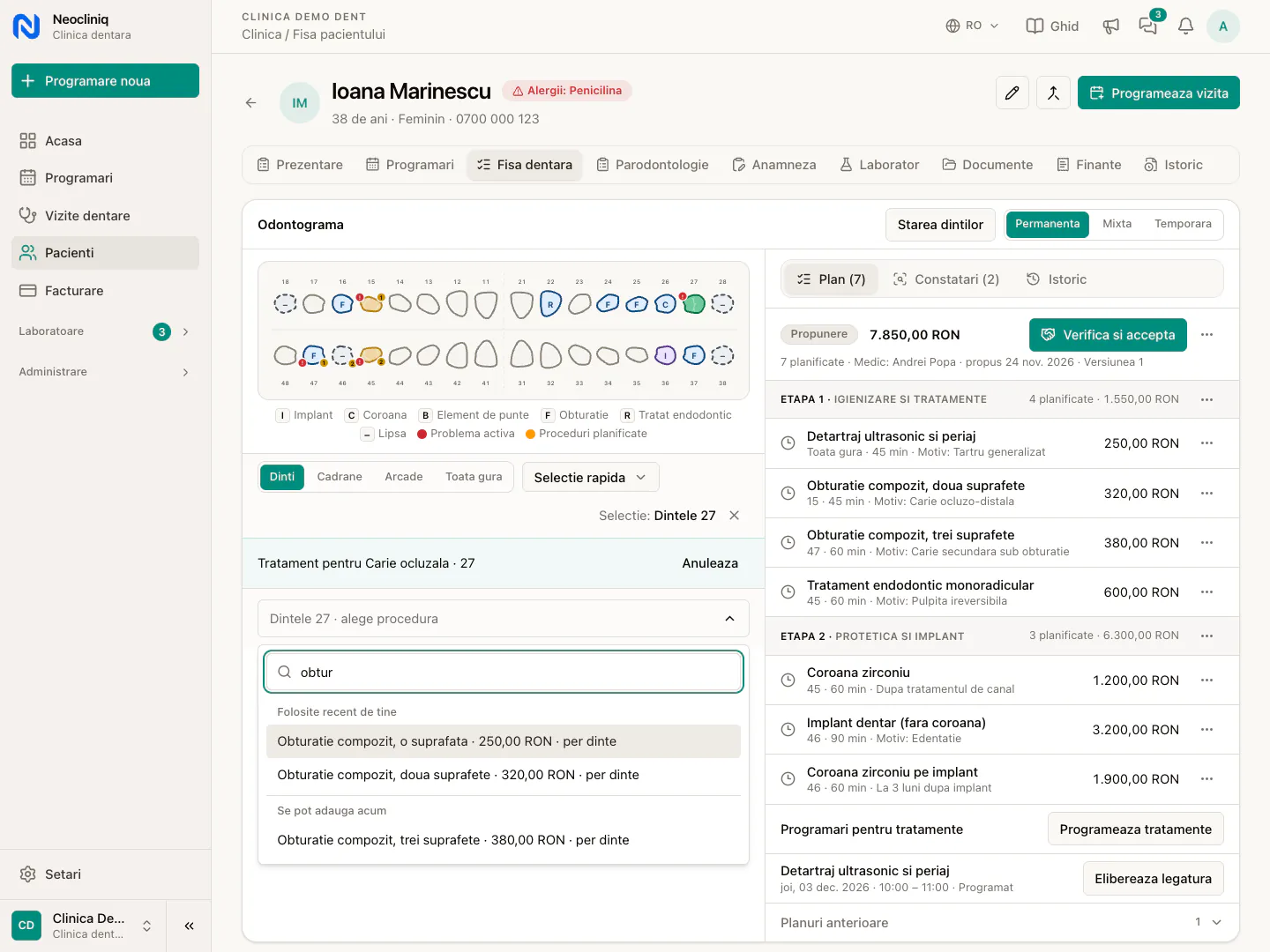
Build the plan in phases, with the procedures and prices from your clinic's catalogue. The patient goes home with a PDF: the tooth chart, the phases with subtotals and a place to sign.
Prices per tooth, quadrant, arch or full mouth
Proposed, accepted, completed: you always know where a plan stands
Changes after publishing need a revision, with a reason
What you mark as done goes straight onto the invoice
View full-size screenshot ↗Actual Neocliniq screens in Romanian, with demo data. Names, cases and amounts are fictional.
Invoices and payments
The work done lands on the invoice by itself.
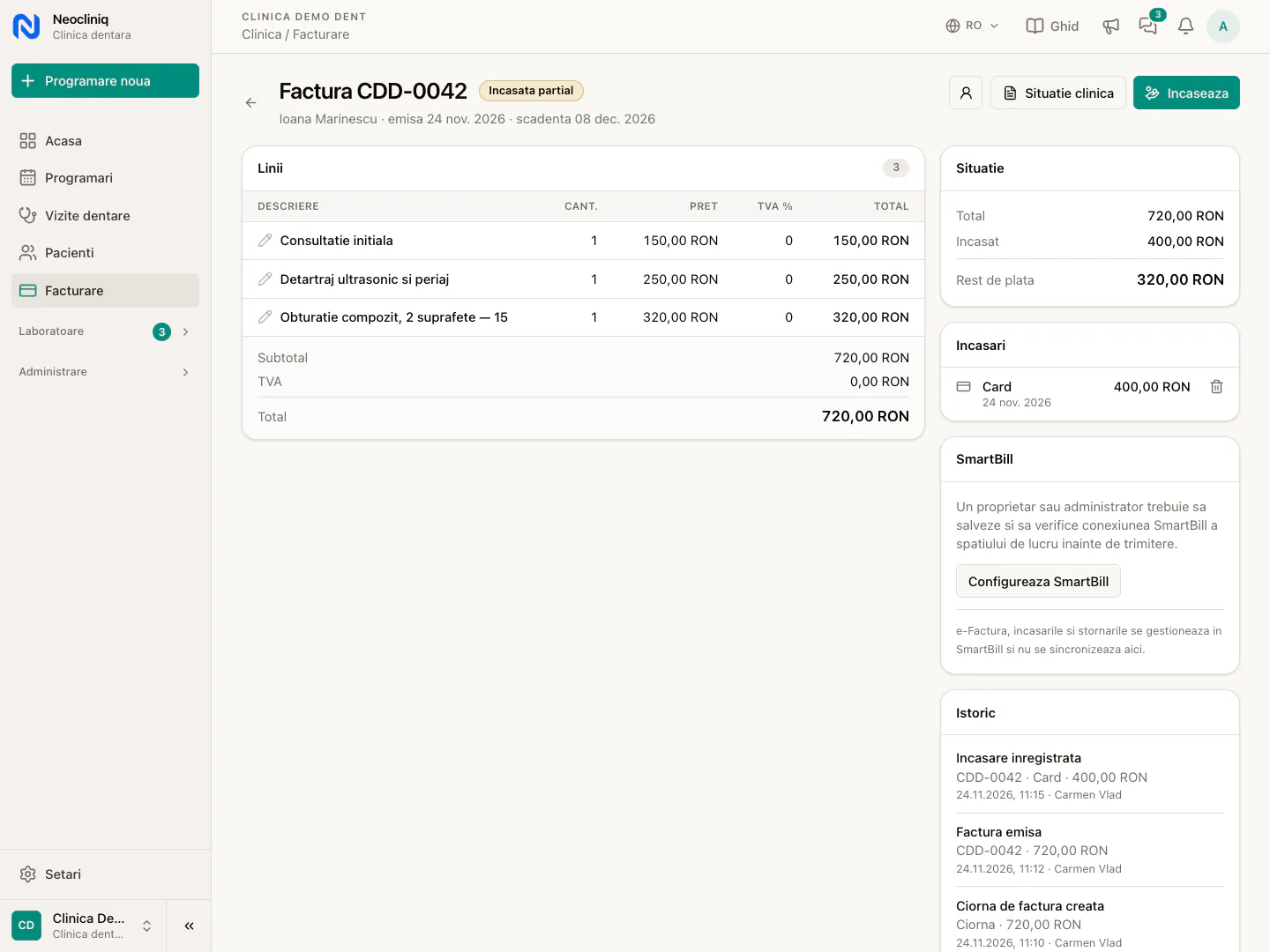
The procedures marked in the visit become invoice lines, with the prices from the plan. Record the payment and see at once what is still owed.
Part payments and the remaining balance, for every patient
Work done and not yet invoiced, in plain sight
Fiscal invoice through your own SmartBill account, optional
Each dentist's pay, worked out from what they did
View full-size screenshot ↗Actual Neocliniq screens in Romanian, with demo data. Names, cases and amounts are fictional.
The clinic's whole day
And the rest of the day, in the same app.
The visit, step by step
The dentist goes through the medical history, the state of the teeth, the findings and the plan, then marks what was done today. At the end, reception gets what there is to collect.
Dentist pay
A base percentage, a percentage or fixed amount per procedure, and a higher percentage above a monthly threshold. Each dentist sees only their own pay.
Recalls and the call list
Patients to confirm, to book and to recall for a check-up sit in one list for reception.
Documents and X-rays
X-rays, photos and scans on the patient record, linked to teeth, with side-by-side comparison and a 3D viewer for STL files.
Materials and stock
Goods received, stock counts, several locations and alerts when a material runs low.
Team and roles
Owner, administrator, dentist, assistant and reception. Reception books and invoices, but does not see the clinical record.
Email reminders
Switch them on in the clinic's settings. The patient confirms or asks to reschedule from a link.
Activity log
Every change stays in the history, with who made it and when. Duplicate records of the same patient can be merged.
Who it is for
Everyone in the clinic gets their own screen.
The dentist
Opens the visit, sees the medical history and tooth chart, notes the findings and marks the work done. Sees their own schedule and pay.
Reception
Books, confirms, checks the patient in and takes payment. Sees what there is to do today, with no access to the clinical record.
The owner
Sees work done but not invoiced, overdue invoices and each dentist's pay. Decides who sees what.
Pricing
Tell us about your clinic and we will send you a price.
Write to us with the number of dental chairs in your clinic. The price includes the full product, with no limit on accounts, and the first 30 days are free.
It is online software for dental clinics and practices: appointments, patient records with medical history and tooth chart, priced treatment plans, visits, invoices, payments and dentist pay. It runs in the browser, on a computer, tablet or phone.
How much does the clinic software cost?
Write to us at bogdan@neocliniq.com with the number of dental chairs in your clinic and we will send you a price. Accounts for dentists, assistants and reception are not limited, and the first 30 days are free.
What counts as a chair?
A chair (a dental unit) is an equipped treatment chair where you see patients. If you have three chairs and five dentists working in shifts, you pay for three chairs.
Can I issue fiscal invoices?
Yes, optionally, through your own SmartBill account: Neocliniq sends the invoice to SmartBill, as a draft or issued directly, and downloads the fiscal PDF. Without SmartBill you still keep track of the work done and the payments in the app.
Does it send reminders to patients?
Yes, by email: switch them on in the clinic's settings, and the patient confirms or asks to reschedule from a link. Text messages are not available yet; reception has a list of patients to call for confirmation instead.
Who sees what in the clinic?
There are five roles: owner, administrator, dentist, assistant and reception. Reception books and invoices, but does not see the clinical record, medical documents or dentist pay. Dentists see only their own pay.
Can I bring my patients from another program?
Yes. The owner or administrator imports the patient list from a CSV file, and the app checks for duplicates.
Where is the data, and what happens if I leave?
The data is hosted in the European Union, on Microsoft Azure. Cancel anytime, right from the app, and your subscription stays active until the end of the period you've already paid for.
Start with your clinic.
Set up in minutes. 30 days free, with the full product.


 View full-size screenshot ↗