Actual Neocliniq screens in Romanian, with demo data. Names, cases and amounts are fictional.
The continuation of DentOps. The platform rebuilt from scratch, by the same team.
Built together with Romanian dental labs. The workflows follow how a real lab actually works.
We migrate DentOps labs. Migration keeps your history and case numbering.
Data hosted in the European Union. Microsoft Azure infrastructure.
Features
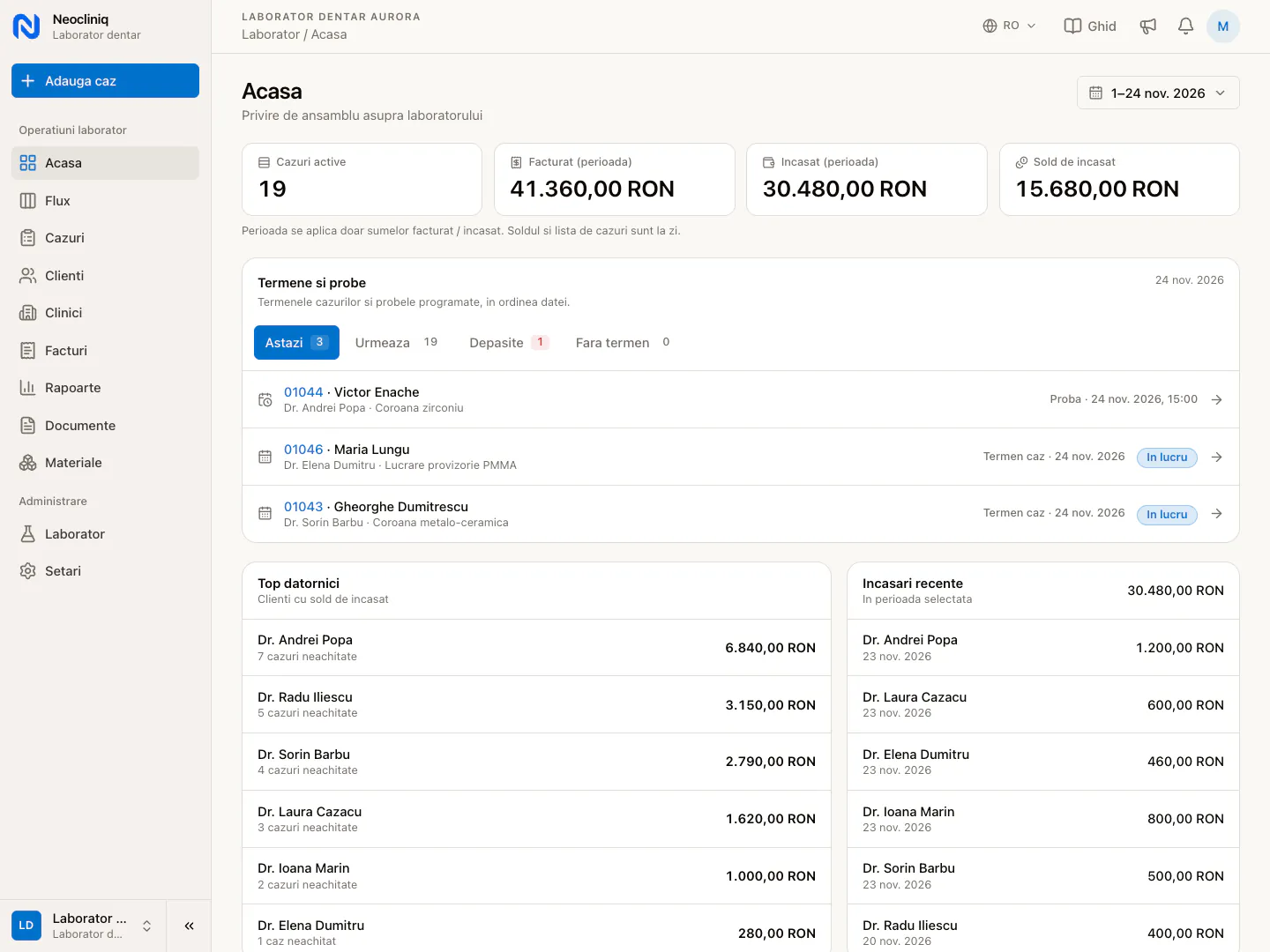
The work and the payments, in one place.
Production stays linked to the case. Estimates bring together the work, the payments and the outstanding balance.
Cases
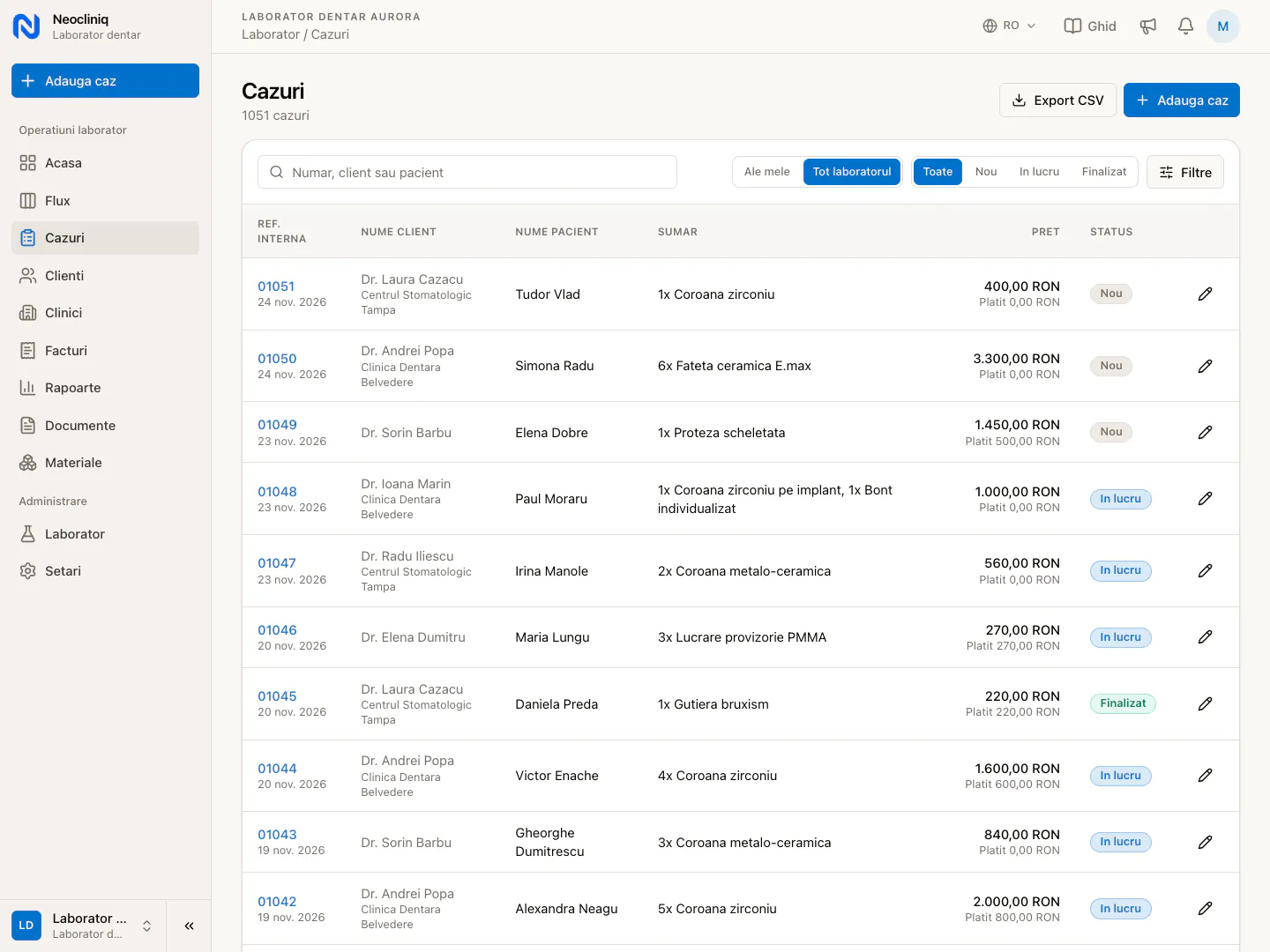
Every case of the lab, in one list.
Each case carries its doctor and clinic, the patient, the services, the price, what was paid and its status. You find any of them in seconds.
Search by case number, doctor or patient.
Filter by status, or see only your own cases.
Export the list to CSV whenever you need it.
View full-size screenshot ↗Actual Neocliniq screens in Romanian, with demo data. Names, cases and amounts are fictional.
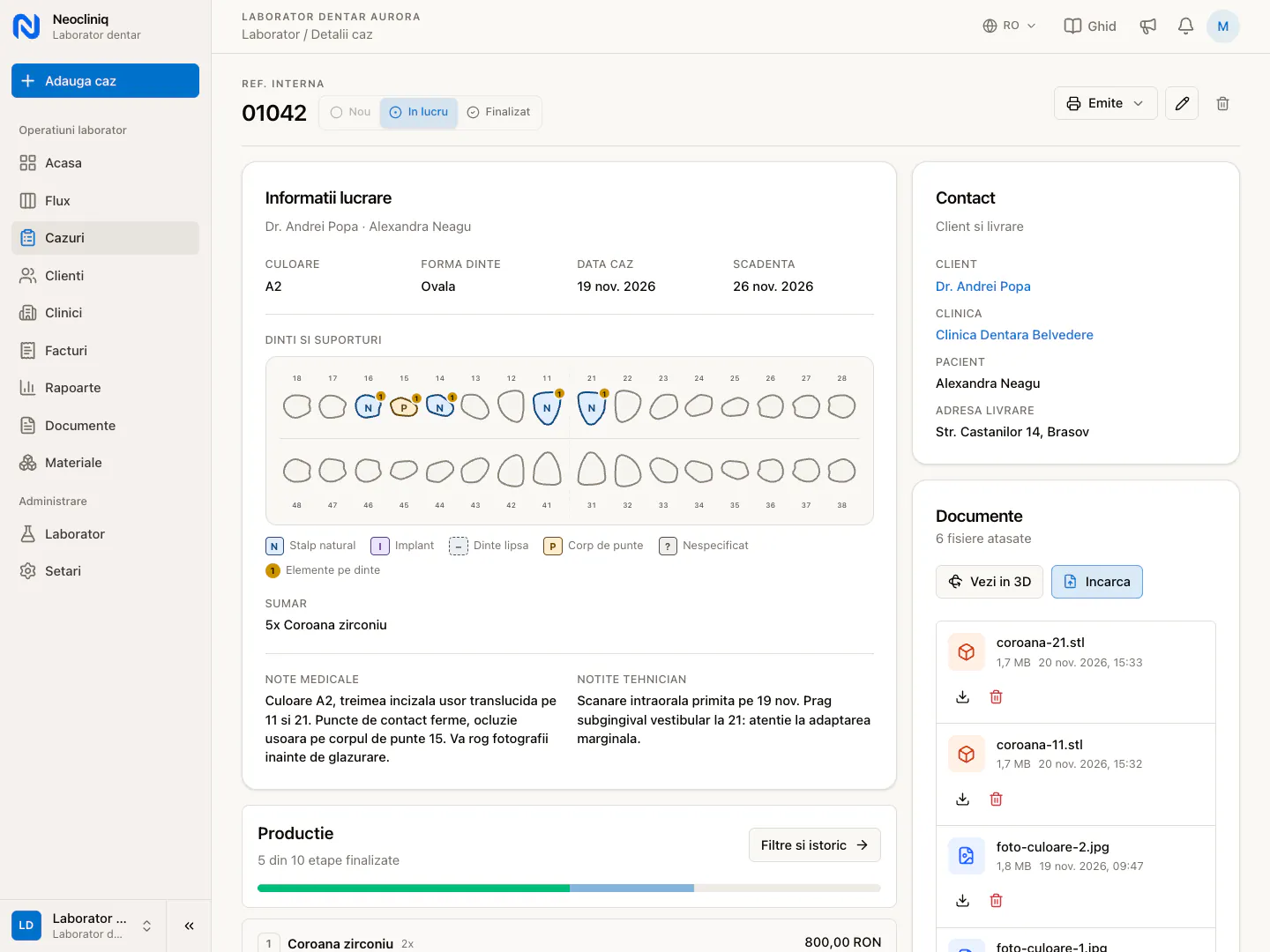
The case page
The whole job on one page.
Teeth and services, shade, try-ins, the doctor’s notes, files and payments stay together on the case.
Attach photos, scans and STL files to the case itself.
Try-ins have their own dates, apart from the final due date.
Record payments on the case and see what is still owed.
View full-size screenshot ↗Actual Neocliniq screens in Romanian, with demo data. Names, cases and amounts are fictional.
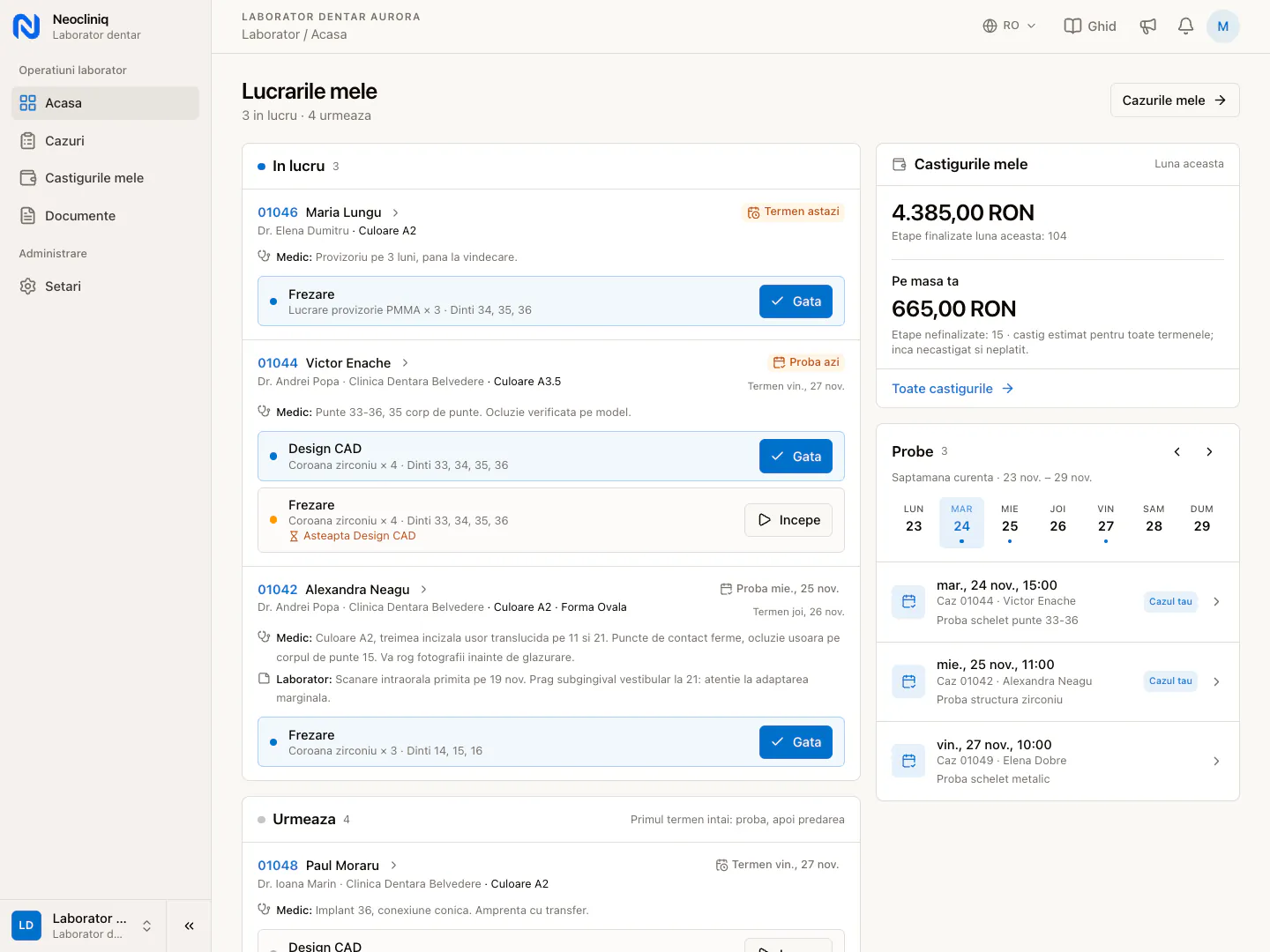
Production and technicians
Each technician sees their own work for the day.
Technicians have their own work queue, on a computer or on the phone. If you work in stages, each case shows who does what and what is done.
Production stages are optional: use them only if you want to.
A technician sees what they earned, never the lab’s prices.
The QR code on the work order opens the case on the phone.
View full-size screenshot ↗Actual Neocliniq screens in Romanian, with demo data. Names, cases and amounts are fictional.
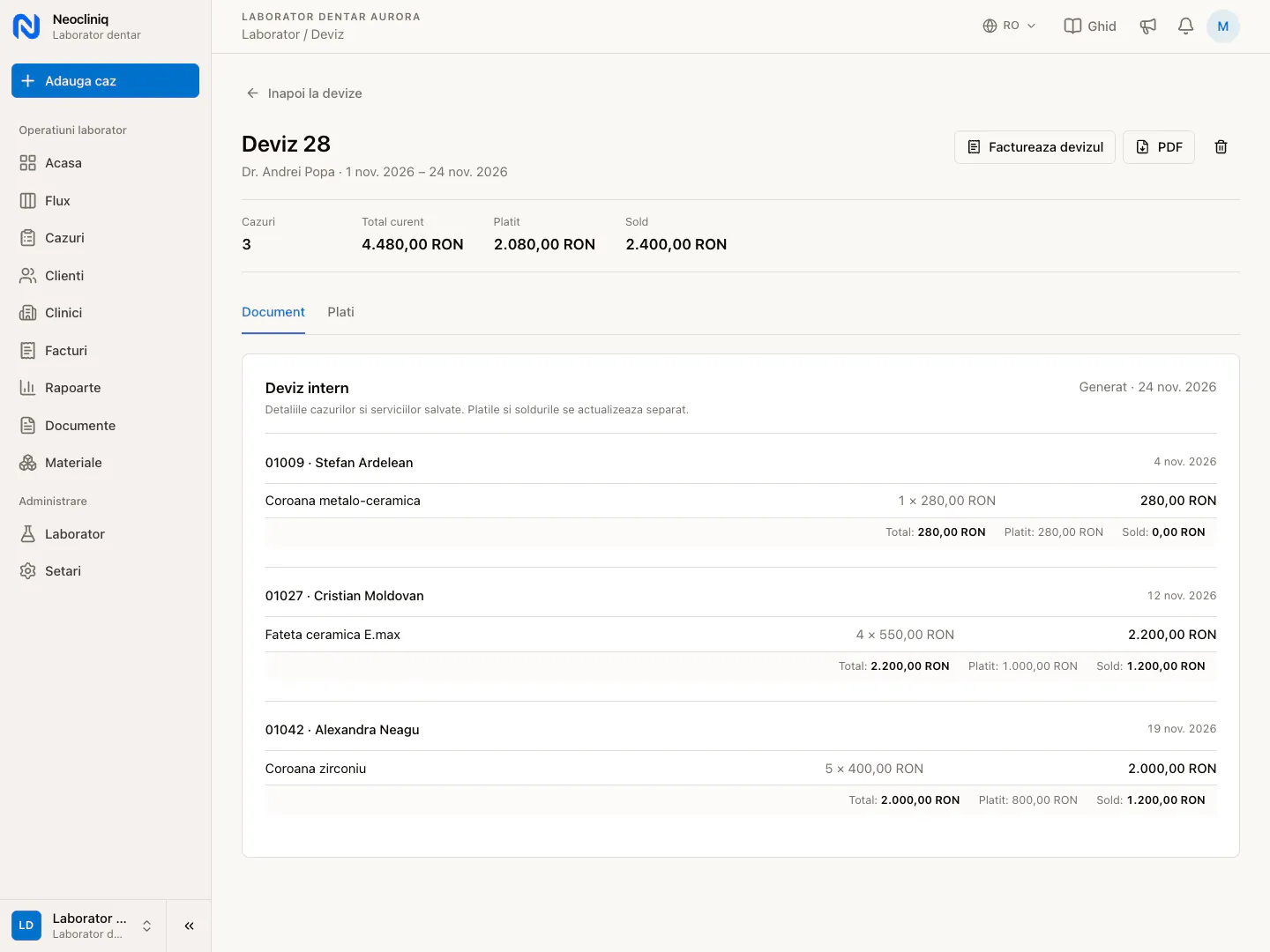
Estimates and balances
The work, the payments, the remaining balance.
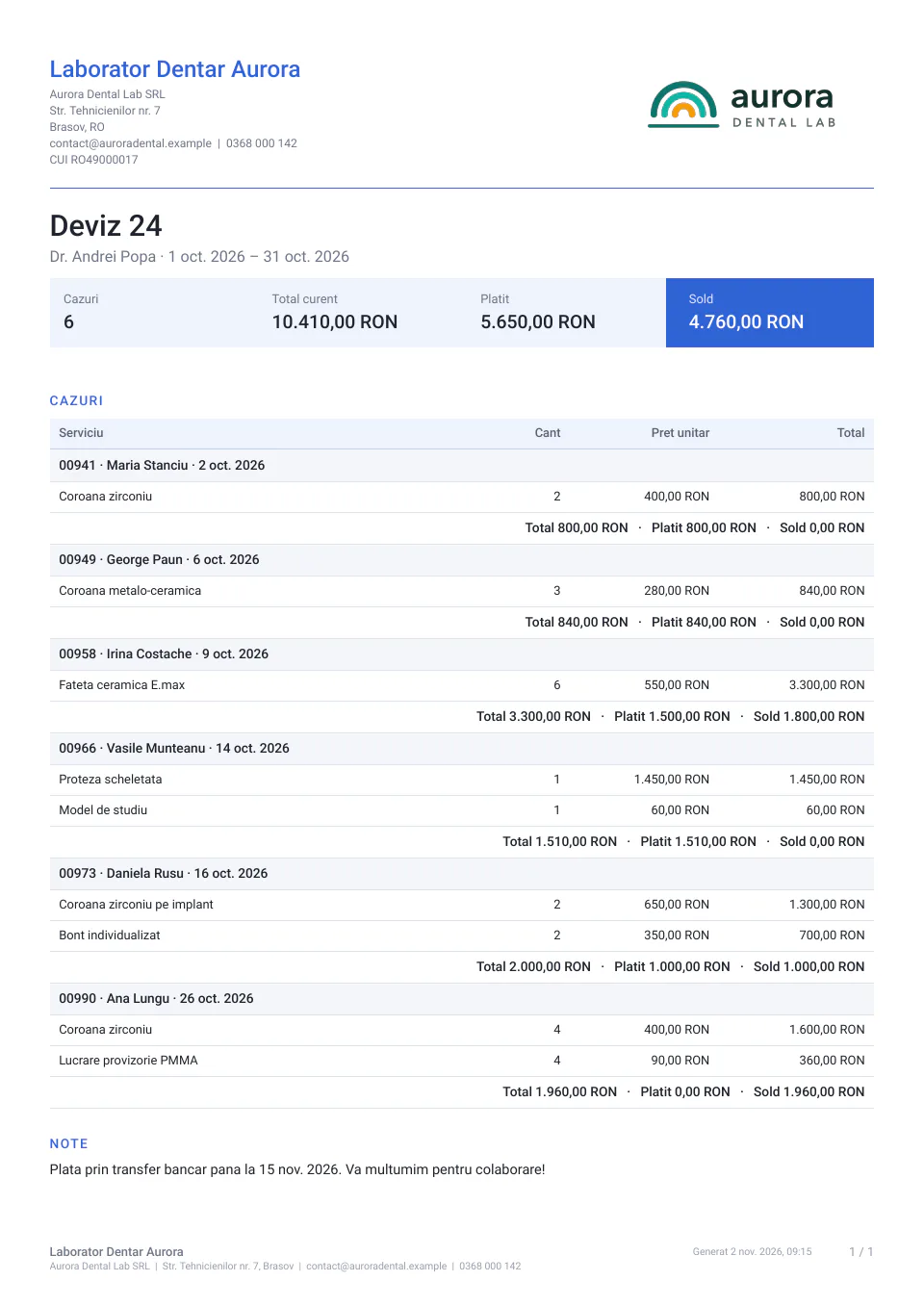
Pick a doctor or a clinic and gather their cases into one estimate. Check the services, the payments and the balance, then export the PDF.
One estimate per doctor or per clinic, for the period you choose.
At the end of the month, generate the estimates for all clients in one go.
Keep the discounts agreed with each doctor, per service.
View full-size screenshot ↗Actual Neocliniq screens in Romanian, with demo data. Names, cases and amounts are fictional.
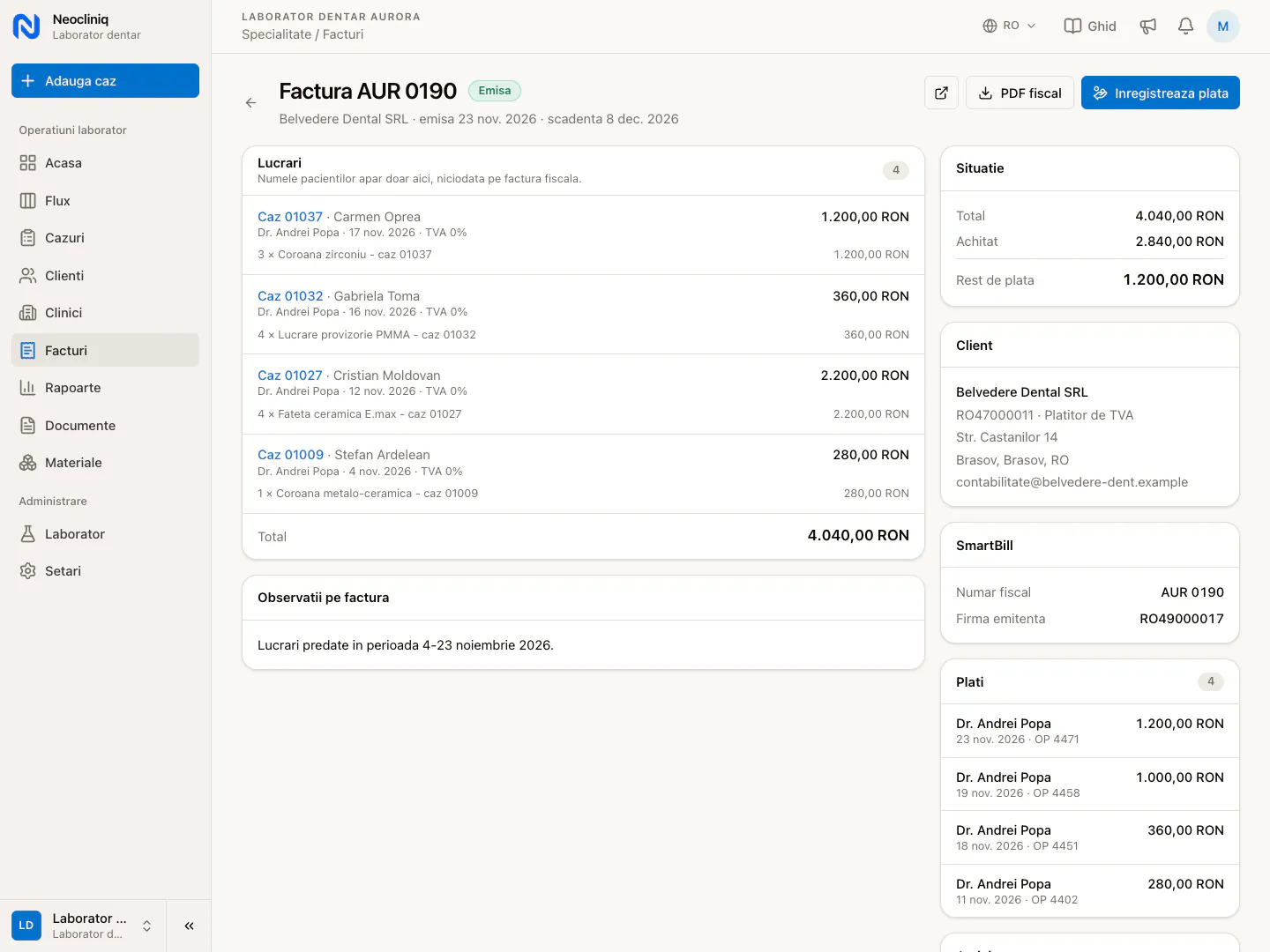
Invoices
The invoice leaves from the estimate, through SmartBill.
Optional, with your own SmartBill account: issue the invoice from an estimate or without one, including a single invoice for a clinic with several doctors.
Keep service prices in EUR; the app converts them at the BNR rate.
Without SmartBill you still keep payments and balances in the app.
View full-size screenshot ↗Actual Neocliniq screens in Romanian, with demo data. Names, cases and amounts are fictional.
Reports
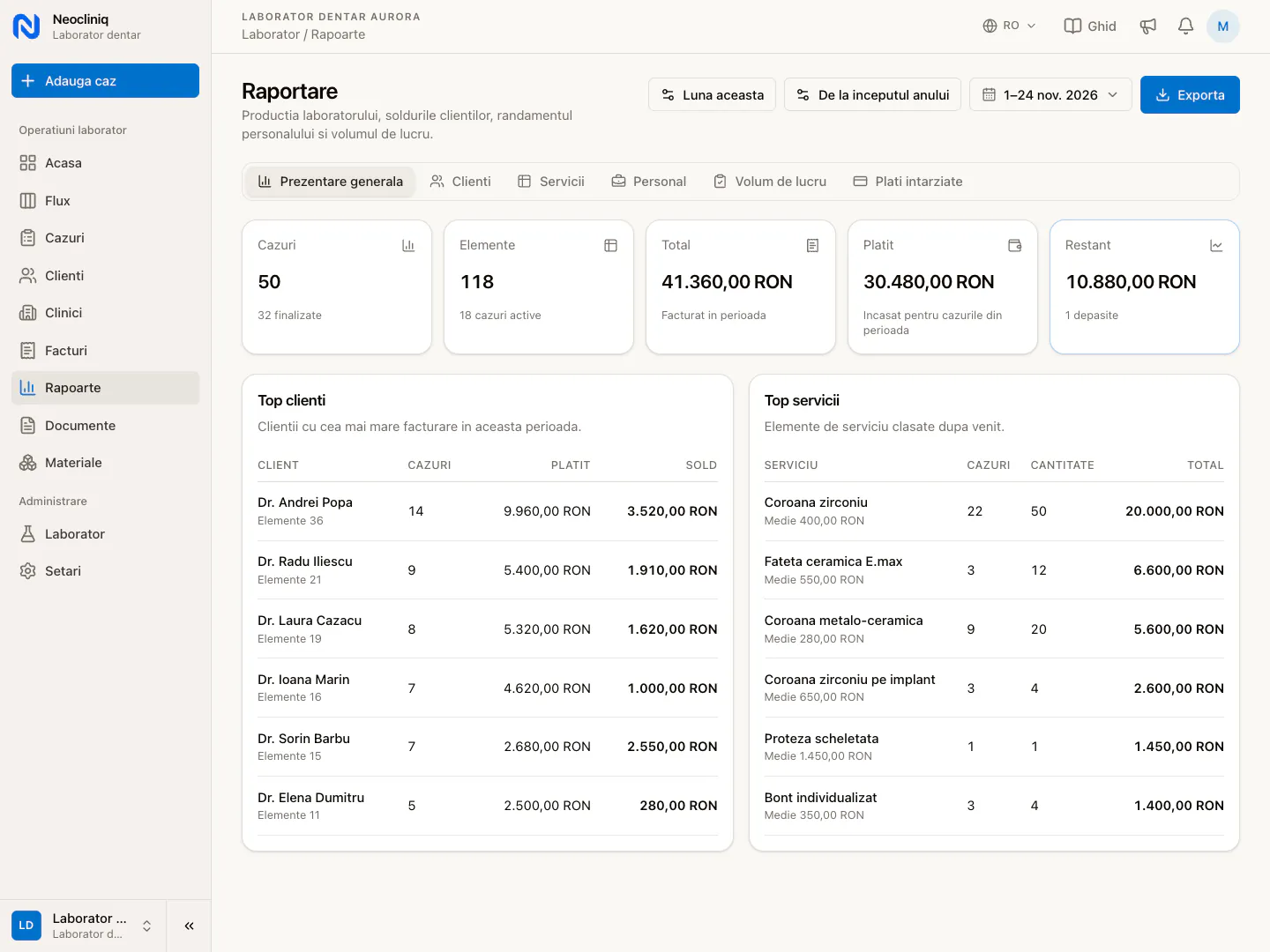
The lab’s numbers, without hand-made spreadsheets.
Follow production, client balances and technician pay. Export the reports to CSV for your own analysis or for your accountant.
Production for a period, by client and by service.
What each doctor and clinic still owes.
Technician pay, visible only to those allowed to see it.
View full-size screenshot ↗Actual Neocliniq screens in Romanian, with demo data. Names, cases and amounts are fictional.
3D scans
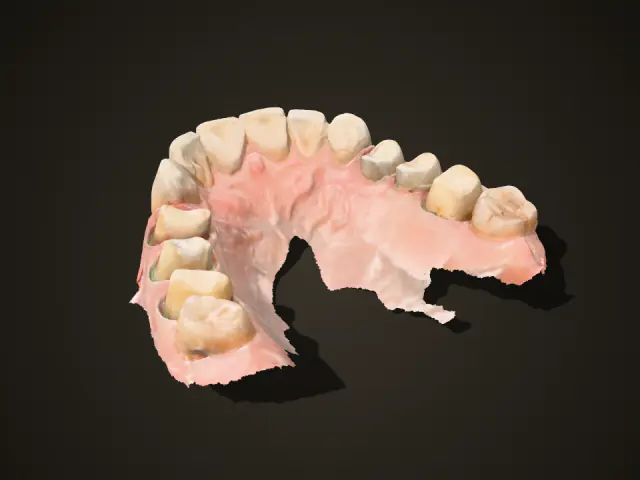
Open the scan in the browser, with no other program.
The doctor sends an STL, a PLY or the archive exported by the scanner. You attach it to the case and see it in 3D right away, in the scanner’s colours, with the arches in occlusion.
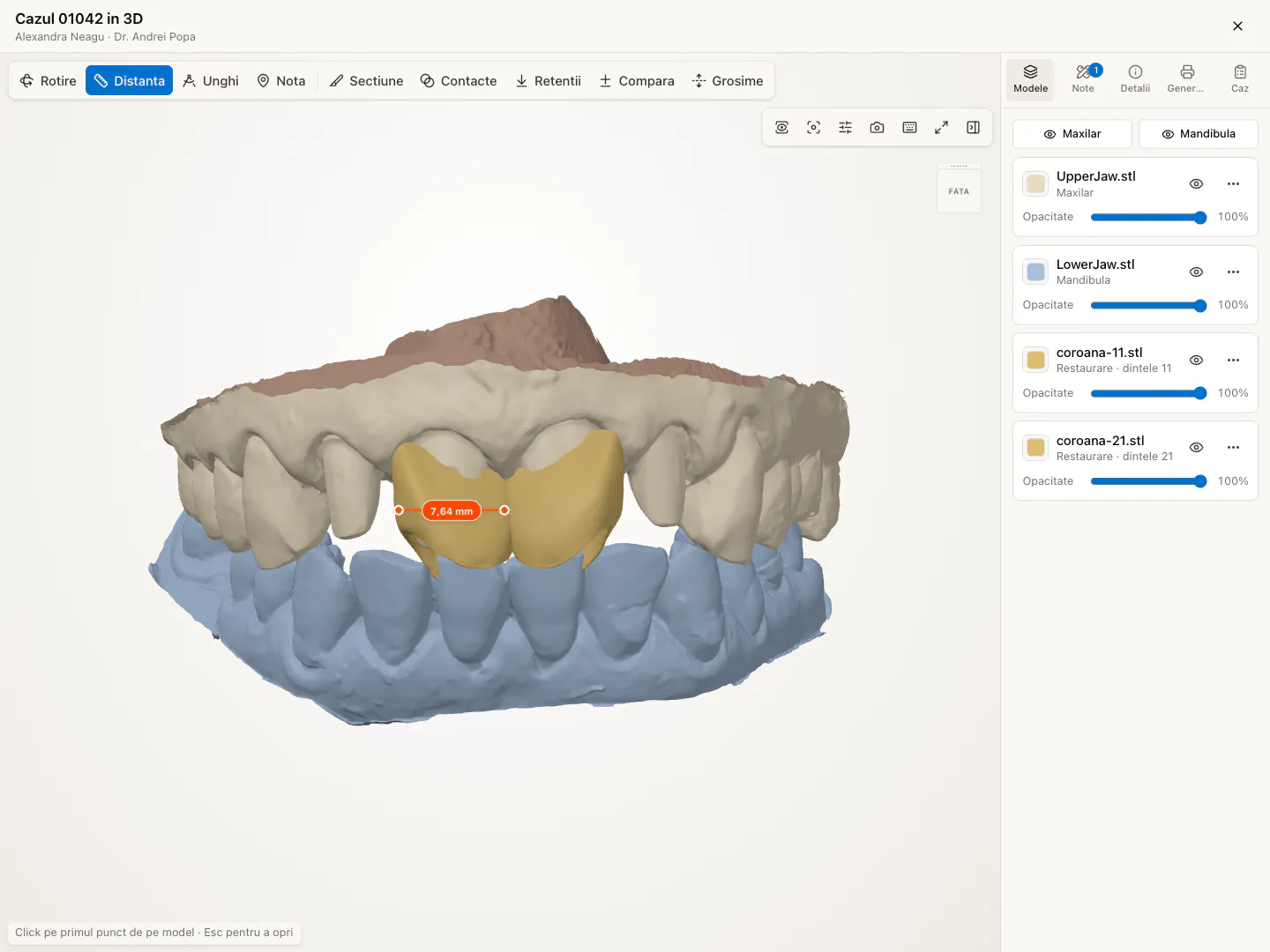
Measure distances and angles right on the surface.
Cut a section and look at the preparation in profile.
Colour maps for contacts, wall thickness and undercuts.
Save a picture with your notes into the case’s documents.
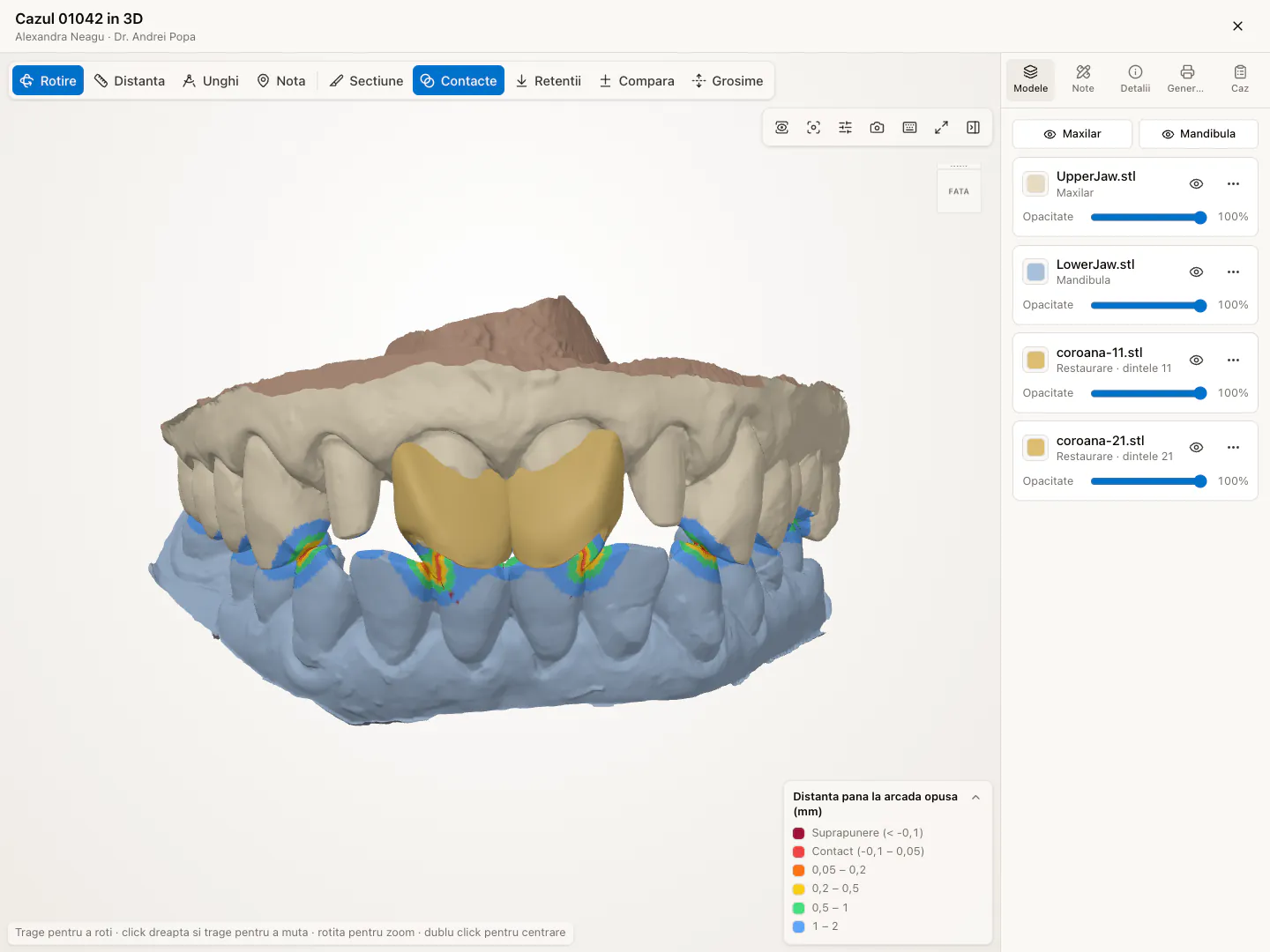
A real intraoral scan (PLY, in the scanner’s colours), with no patient details. Drag it to turn it.
See the contacts before you mill. The contact map colours each arch by its distance to the opposite one, down to tenths of a millimetre.
Measure on the scan. Click two points and read the distance in millimetres; angles work the same way.
Actual Neocliniq screens in Romanian, with demo data. Names, cases and amounts are fictional.
Documents
The lab’s paperwork, ready to print.
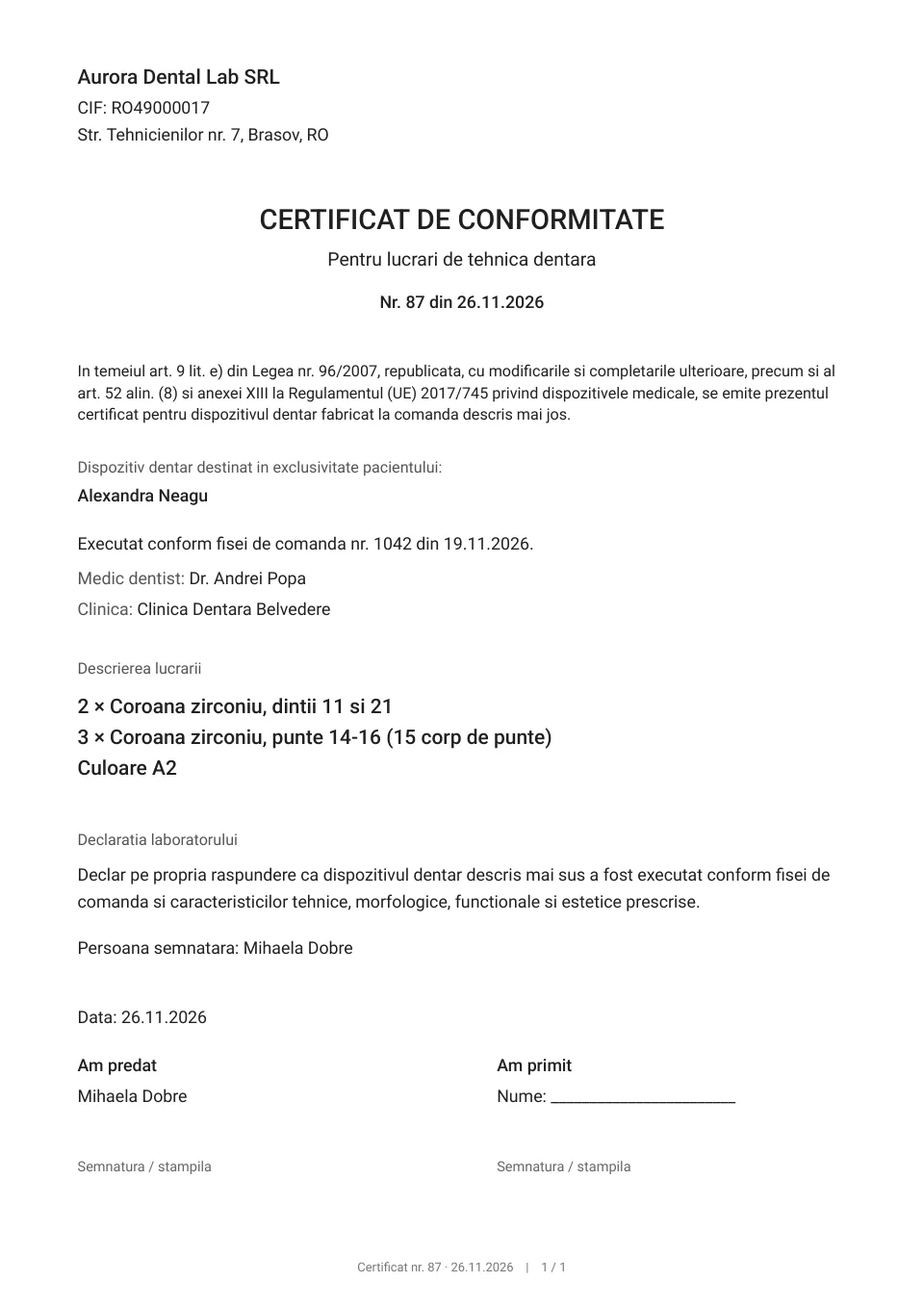
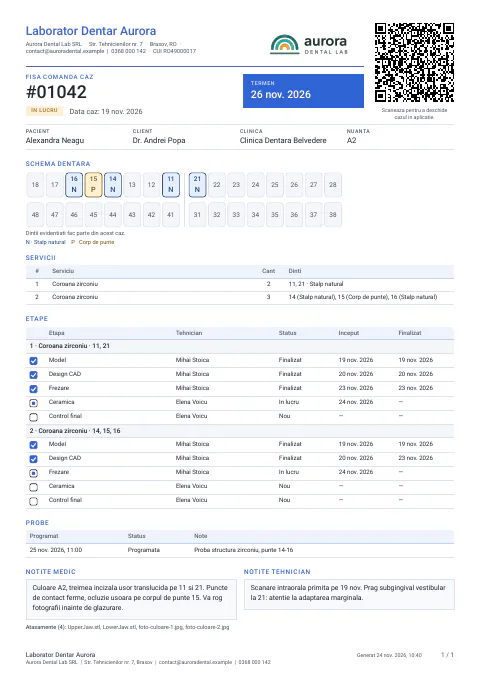
You enter the case once. The work order, the estimate and the certificate all come out of the same data.
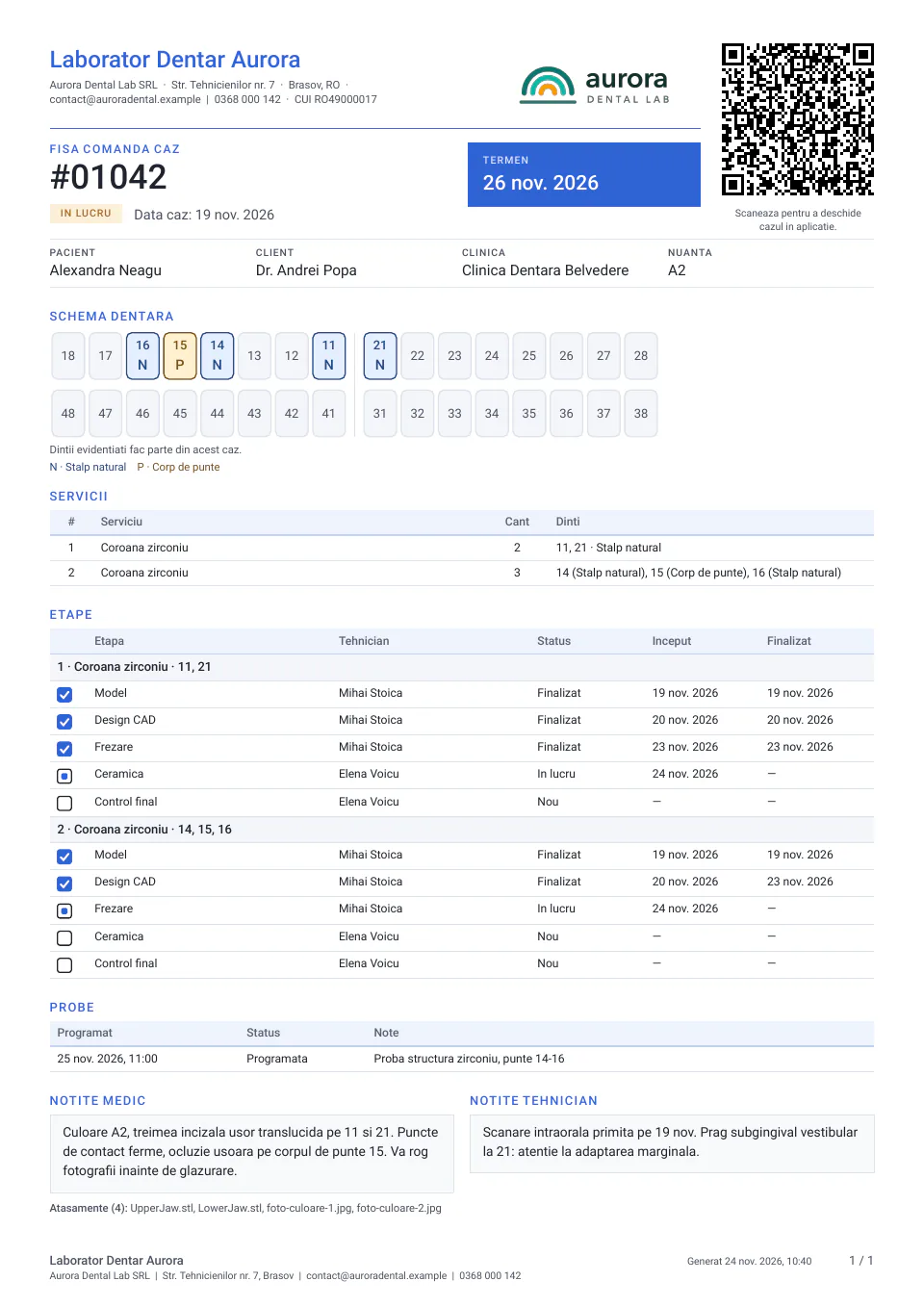
Work order with a QR code
On A4 or A5, made for black-and-white printers. It carries the tooth chart, the services, the stages and the doctor’s notes, and the QR code opens the case on the phone.
Estimate for a doctor or a clinic
The cases of the period with their services and prices, what was paid and the remaining balance. Four layouts, from a summary to full detail.
Certificate of conformity
Numbered automatically, filled in from the case and saved as a PDF on it, ready to sign.
Documents generated by the app, in Romanian, with demo data.
Who it is for
Everyone in the lab gets their own screen.
The owner
Sees what is in production, what is running late and what each dentist and clinic owes.
The technician
Has a personal work queue, on a computer or a phone, and sees their earnings. The lab's prices stay hidden.
Whoever enters the cases
Records the case, prints the work order with its QR code and produces the estimates at the end of the month.
And more
What else you get, in every plan.
Mobile app
For iPhone and Android. Technicians see their work and scan the QR code on the work order; the owner sees cases, clients, estimates and payments.
Clinics and doctors
Case history, agreed discounts and the balance of every doctor and every clinic you work with.
Team and roles
Everyone has their own account. Prices and pay are visible only to the roles allowed to see them.
In Romanian and English
Each team member picks the language they work in.
Room for your files
From 100 GB included, for scans, photos and documents. You can add more when you need it.
Prices in euro
Keep service prices in EUR and the app converts them at the National Bank of Romania's rate.
Documents and contracts
Folders for the lab and for every client, with the date each contract expires.
A printable model from a scan
Turn an arch scan into a model with a base, ready to print, right in the browser.
Sign up online in a few minutes. You're straight into the app, with a 14-day trial and the full product at your fingertips.
2
Bring in your services and your team.
Your service list with your prices, your production stages, your colleagues added by their email address — each with their own role.
3
Your first case goes into production.
From here, cases flow through their stages, balances take care of themselves, and estimates go out on time. The notebook stays in the drawer.
Coming from DentOps?
We migrate your data for you: clients, clinics, case history, and balances. Case numbering continues right where it left off, and your team works in Neocliniq from day one.
It is online software for dental laboratories. You track cases by stage and technician, the dentists and clinics you work with, and your estimates, payments and balances. It runs in the browser with nothing to install, and has a mobile app for iPhone and Android.
How much does the lab software cost?
Write to us at bogdan@neocliniq.com with the number of technicians in your lab and we will send you a price. Every plan includes the full product, and you can try it free for 14 days first.
Can I open STL and PLY scans in the app?
Yes. STL, PLY and OBJ files attached to a case open in 3D right in the browser, and so do the ZIP archives a scanner exports. You can measure distances and angles, cut sections and save pictures to the case, with no other program.
How does the 14-day trial work?
You get the full product — no limited version. At the end, pick a plan and carry on right where you left off — payment is by card, straight from the app.
Can I cancel anytime?
Yes, right from the app — no phone calls, no minimum terms. Your subscription stays active until the end of the period you've already paid for.
Is there a mobile app?
Yes, for iPhone and Android. Technicians see their work and scan the QR code on the work order, and the owner and manager see cases, clients, estimates and payments.
Where is my lab's data?
In the European Union, on Microsoft Azure infrastructure, with role-based access and personal accounts. And you can export it to CSV anytime — it's yours.
What languages does the app come in?
Romanian and English. Switch anytime, from inside the app — each team member picks their own.
I use DentOps. What happens to my data?
We migrate it for you. Clients, clinics, case history, and balances transfer into Neocliniq, and case numbering continues right where it left off. Existing DentOps subscriptions keep their current plan and price. Write to bogdan@neocliniq.com and we'll schedule your migration together.
Start with your lab.
Set up in minutes. 14 days free, with the full product.
 View full-size screenshot ↗